
Introduction
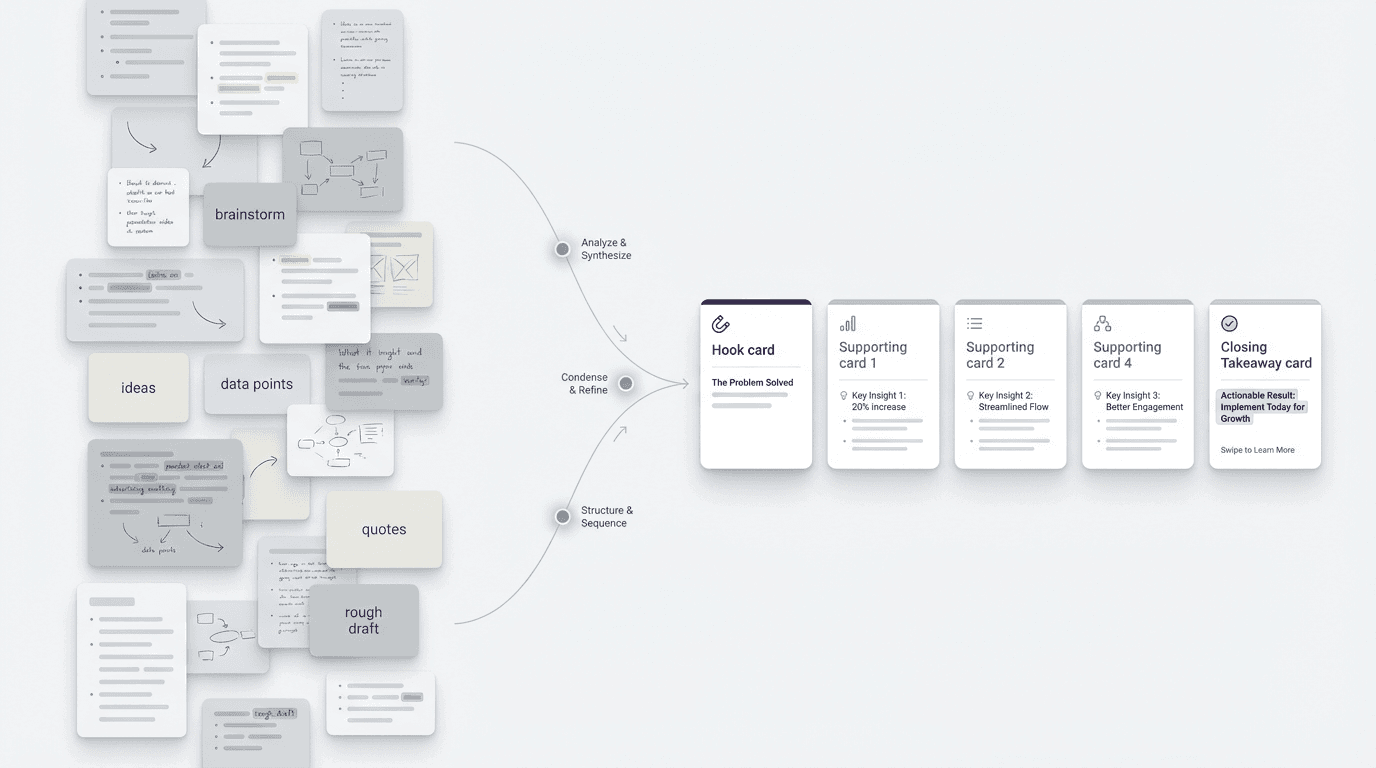
If you want to turn notes into a carousel post, the useful move is usually not to keep organizing the notes. It is to decide what the carousel needs to do, then shape the notes into that structure as quickly as possible.
FormaLM helps shape existing input into a finished social format before the design file enters the workflow.
A carousel post is a sequence, not a pile
Begin by treating the carousel as a sequence.
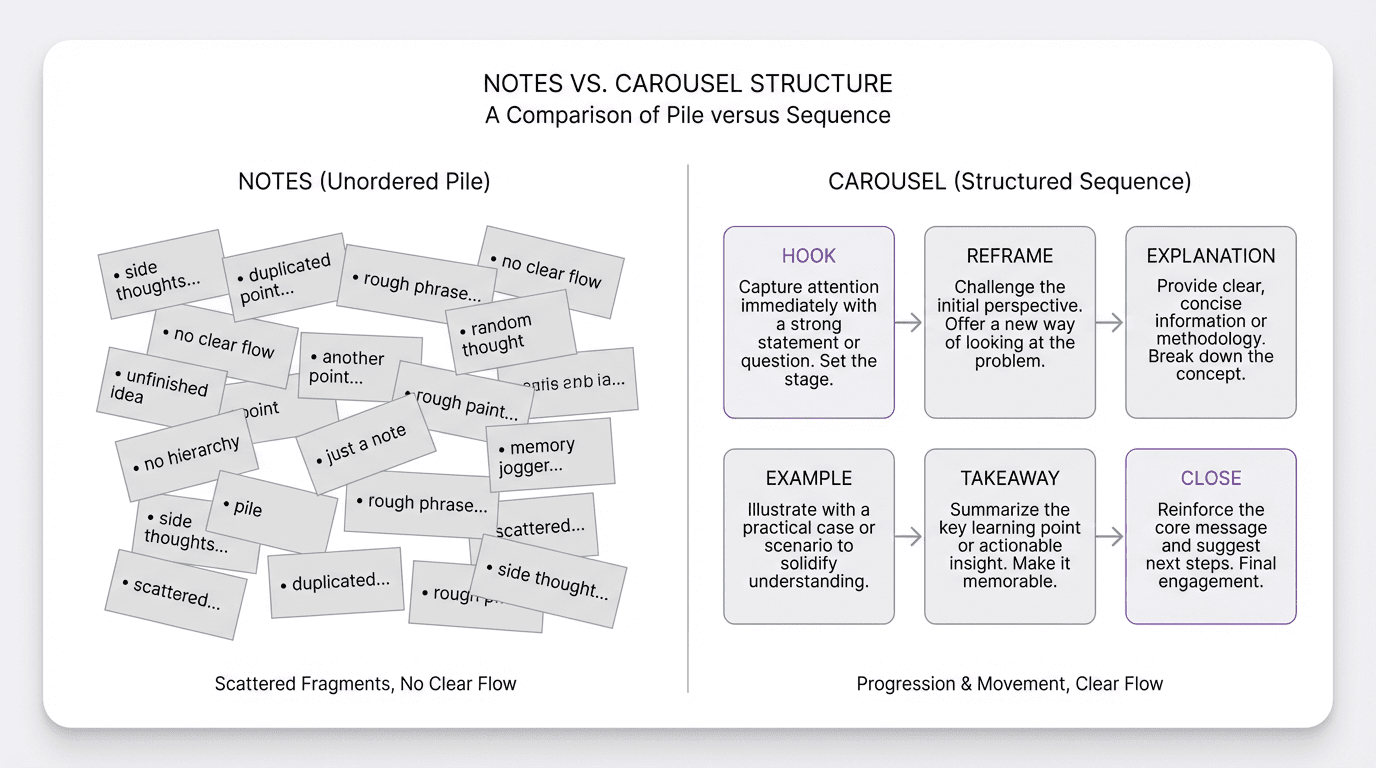
Notes are allowed to be dense, uneven, and out of order. A carousel cannot be.
A carousel post only works when each card has a clear job in the sequence. The first card has to stop the scroll. The middle cards have to advance one coherent idea. The last card has to land the point cleanly enough that the reader feels the post is complete.
That means the format has stronger boundaries than notes do. A note pile can contain examples, side thoughts, duplicate phrasing, half-decisions, and context fragments all at once. A carousel needs hierarchy. It needs pacing. It needs a reader to know why they should keep swiping.
So before you rewrite anything, make one shift in how you see the task.
Do not ask, "How do I clean up these notes?"
Ask, "What sequence should this become?"
Start with one sharp takeaway, not all your points
Most weak carousel drafts try to preserve too much.
The author has ten useful points in their notes and assumes the post should carry all ten. That instinct makes sense, but it usually produces a carousel that feels crowded before design even begins.
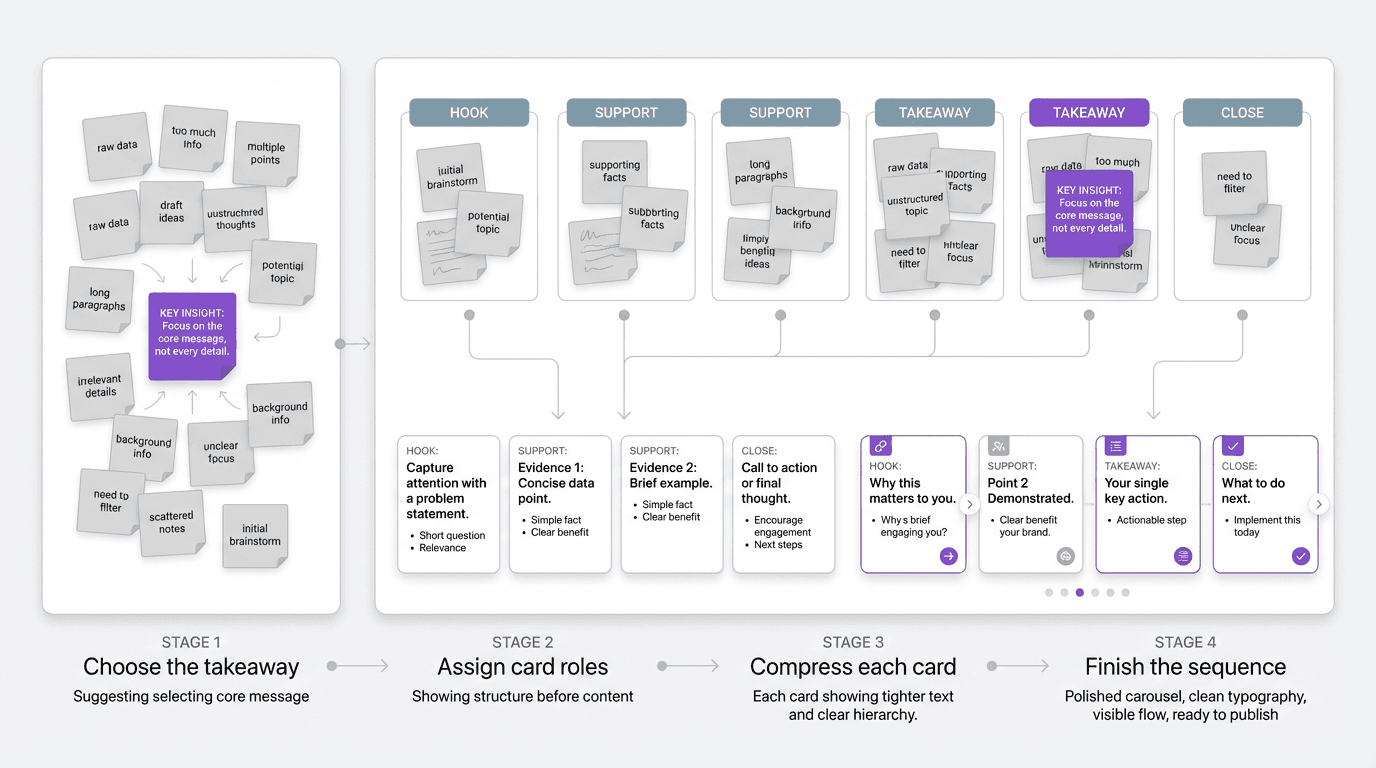
The better move is to pick the one takeaway the post should leave behind.
That takeaway becomes the spine. It decides what belongs in the sequence and what does not.
If your notes are about improving onboarding, the takeaway might be:
"Most onboarding friction comes from unclear sequence, not missing information."
If your notes are about weekly updates, the takeaway might be:
"A useful update is not a diary of the week. It is a short structure for decisions, risks, and next moves."
Once that line is clear, the rest of the notes become material in support of it rather than candidates for equal space.
At this point, the notes become lighter because one idea, rather than everything you know, defines the post.
Turn the notes into card roles before you touch design
Once the takeaway is set, map the carousel at the level of roles.
Do this in plain language first. No layout decisions yet. No design tool yet. Just define what each card needs to do.
A simple carousel structure usually looks like this:
- hook
- reframing point
- explanation
- example or contrast
- practical takeaway
- closing line or CTA
Not every post needs exactly six cards, but most good carousels have a structure close to this. The cards behave differently from each other. They are not equal containers for equal bullets.
Moving straight from notes into design combines unresolved editorial decisions with typography, spacing, and layout. A short social post then becomes a larger project than its output warrants.
When you turn notes into card roles first, the work becomes much more decisive. You can see the missing parts early. You can tell whether the post has momentum. You can cut repetition before it becomes visual clutter.
Compress each card to one idea that can survive a swipe
Use this as the pressure test.
Each card should earn its place with one idea, not a paragraph pretending to be a slide.
Notes often carry useful density because they were captured for you, not for a moving reader. A carousel works differently. The reader is making a very small decision on every card: continue or leave. That means each slide has to resolve quickly.
In practice, that usually means:
- one claim per card
- one supporting sentence or phrase cluster
- one visible transition to the next card
If a card contains three separate ideas, split them or cut them. If a card needs long setup to make sense, the structure is probably wrong earlier in the sequence. If the card repeats what the previous one already established, it is taking space without increasing clarity.
The carousel format forces selection and reveals when the notes still behave like background material.
Save your best detail for the middle, not the first card
One common mistake is trying to prove everything too early.
The first card does not need the full argument. It needs enough tension or clarity to make the next swipe feel worth it. The middle is where the explanation earns its place.
That pacing matters because a carousel is not a static document. It is a guided reveal.
If your notes contain a strong example, a useful contrast, or a phrase that makes the whole idea click, do not spend it too early unless it is the clearest possible hook. Often the better structure is:
- name the problem sharply
- reframe what is happening
- show the example that makes the point obvious
- land the practical takeaway
That progression gives the post a reason to keep going. It also keeps you from dumping the entire note set into the opening cards out of anxiety that the reader will miss something important.
Cut everything that belongs in the caption, not on the slides
Another useful filter is deciding what the carousel itself should carry and what can sit below it.
Many creators overload slides with context that would work better in the caption. That usually happens because the notes contain nuance, caveats, and secondary points that feel too valuable to lose.
But a carousel post is not supposed to hold every layer of the argument. It is supposed to make the main structure legible fast.
Good candidates for the caption:
- extra context
- side examples
- caveats
- supporting detail
- links between the post and a broader workflow
Good candidates for the slides:
- the central claim
- the progression of ideas
- the contrast or example that makes the claim stick
- the final usable takeaway
This boundary matters because it protects the format. When too much caption material gets promoted onto the slides, the carousel stops feeling clean and starts feeling like screenshots of a rough draft.
Rewrite for card language, not note language
Even after the structure is right, the wording often still sounds like notes.
Notes tolerate shorthand, repetition, and unfinished grammar because they are private memory aids. Carousel cards need tighter sentence pressure. The language has to land quickly.
That usually means rewriting toward:
- shorter lines
- stronger parallel phrasing
- cleaner contrasts
- fewer qualifiers
- more explicit transitions
A note might say:
"People keep collecting fragments about the post but still do not have an actual sequence they can publish."
A card version might say:
- The problem is not missing ideas
- The problem is missing sequence
The tighter wording fits the format.
This task sits between a notes tool and a design tool. FormaLM pushes the rough material into a finished structure before polished layout begins.
Check whether the post feels complete before it looks polished
Before you worry about design quality, ask whether the sequence already works in plain text.
Can someone read the card list and understand the argument?
Does the hook create a reason to continue?
Do the middle cards progress instead of circling?
Does the last card feel like an ending rather than a leftover note?
If the answer is no, more styling will not fix it. The issue is still structural.
Visual polish cannot complete loose logic. Check the sequence before using design to move the post toward publication.
A strong carousel usually feels done before it looks done.
Turning notes into a carousel post is mostly about finishing the structure
With the notes in hand, the missing piece is a usable sequence with clear card roles, sharper phrasing, and enough compression to become publishable.
Capture tools collect material, and design tools present a settled idea. Focus on the middle step: turning rough input into a clear sequence for the carousel.
When the takeaway is sharp, the card roles are clear, and each slide carries one idea, the carousel is ready for visual production.