
Introduction
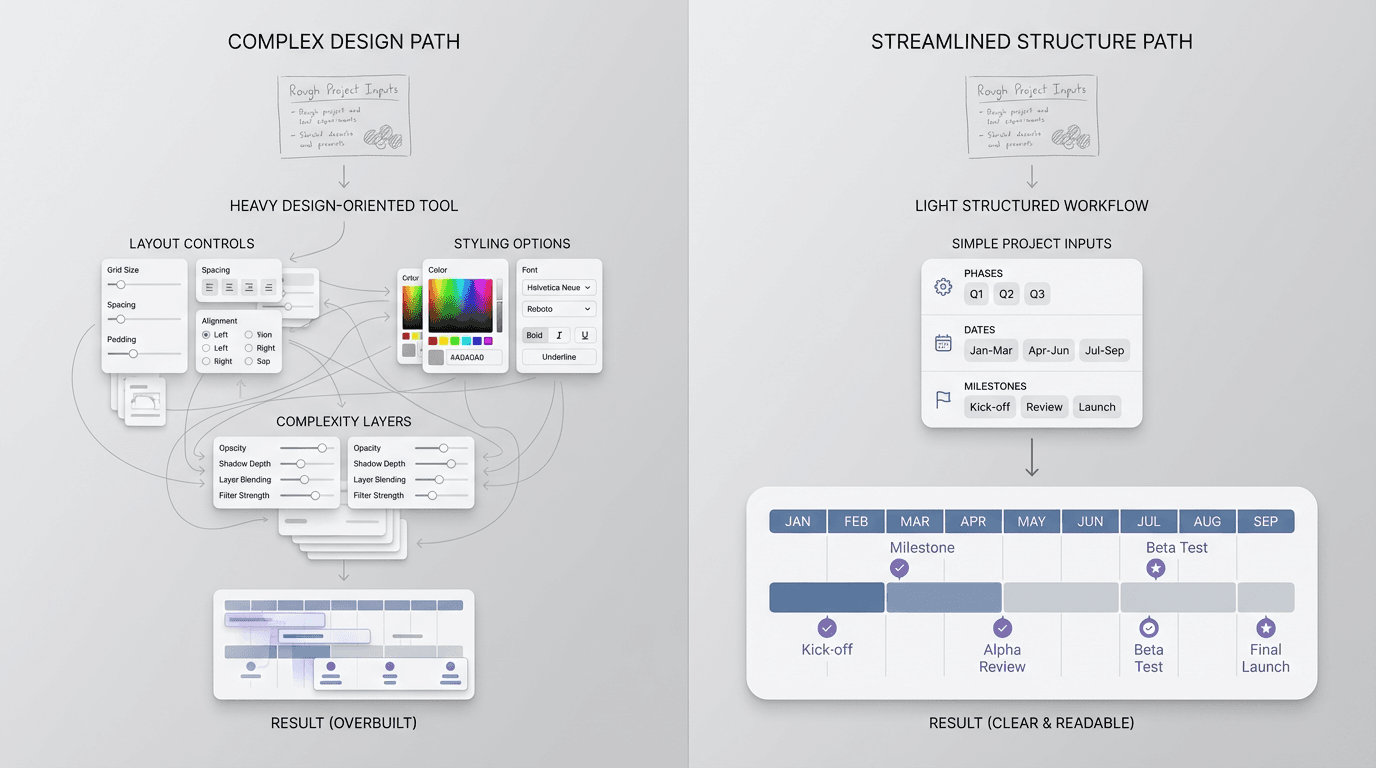
This guide compares the main categories, shows where each one fits, and gives you a practical way to choose without turning a straightforward timeline into a larger system than the project needs.
Quick answer: choose a project timeline tool when the timeline should run active work; choose a visual timeline maker when the finished artifact is a presentation or client deliverable; choose a structured workflow when rough notes, dates, or research need to become a clear sequence first. A project timeline builder is usually the creation surface, while a project timeline template is the starting structure. Treat those as different jobs before comparing features.
What a project timeline maker needs to do
Before comparing products, define the minimum useful result. Most project timelines need to make five things visible:
- the order of phases or milestones
- the timing of each stage
- the owner of the work
- the dependencies that can change the schedule
- the current version people should discuss
The balance changes by audience. A delivery team may care most about dependencies and live status. A client may need a concise view of phases and approval points. Leadership may need a readable summary rather than task-level detail.
Start by deciding whether the timeline is a planning system, a visual artifact, or a communication format.
Project timeline maker vs. tool, builder, and template
Search labels overlap, but they usually point to different expectations. Use this quick map before opening a feature list.
| Search phrase | What the reader is usually trying to finish | What to evaluate first |
|---|---|---|
| Project timeline maker | A usable timeline for a project or audience | The job, audience, revision pattern, and output destination |
| Project timeline tool | A system that supports ongoing project work | Task ownership, dependencies, status, and schedule changes |
| Project timeline builder | A way to assemble and edit a sequence | Speed to first draft, control over dates, and ease of rearranging milestones |
| Project timeline template | A repeatable structure to fill in | Fields for phases, timing, owners, deliverables, and dependencies |
The terms are not interchangeable. A builder can help you make one timeline without becoming the system that runs the project. A template can clarify the source without deciding whether the final output belongs in a planning system, a document, or a presentation. If you need that starting structure, use the project timeline template with practical examples before choosing a maker or tool.
Compare project timeline maker categories before choosing
Most timeline tools fall into three practical categories. None is universally best.
| Tool category | Best use | Main tradeoff | Revision model | Typical output |
|---|---|---|---|---|
| Project-planning tools | Coordinating tasks, owners, dependencies, and live delivery | More setup and operational detail | The timeline changes with the project system | Gantt view or live project plan |
| Visual timeline makers | Building a polished timeline for a deck, report, or client presentation | Manual layout work increases as dates change | Edit the visual composition directly | Branded graphic or presentation slide |
| Structured timeline workflows | Turning rough inputs into a clear sequence for an update, brief, or working document | Less suited to live resource planning or freeform design | Revise the source and regenerate the structure | Readable table, outline, or formatted timeline draft |
A project-planning tool is the strongest choice when the timeline must remain connected to active tasks. A visual maker is better when presentation quality is the main outcome. A structured workflow fits when the sequence itself is the work: the team has scattered notes, dates, or milestones and needs a usable version quickly.
Representative project timeline tools by job
Compare the capability that will matter when a date changes. A timeline can look complete while still leaving the team to repair the schedule manually.
| Tool or workflow | Work it supports | What to check before choosing |
|---|---|---|
| Asana Timeline | A project view built from dated tasks | Whether the team will maintain its task dates and dependencies in Asana; Timeline is available on Starter and higher current tiers |
| Miro Timeline | Editable records, dates, milestones, and shared views on a board | Whether you need the Timeline widget or a drawn template; dependency relations require Business or Enterprise, and automatic date adjustment based on dependencies is not currently available |
| FormaLM Event timeline | An ordered explanation built from events and source material | Whether the finished result should be a web page or infographic; use a project system when you need live task scheduling |
The Asana Timeline documentation describes how dated tasks appear in the project view. The Miro Timeline documentation distinguishes editable records from dependency relations and lists their current limits. Capability and plan details were checked on October 13, 2026; recheck them before purchase.
Miro therefore spans visual mapping and interactive planning. A drawn timeline template and its Timeline widget are different surfaces. Ask which one a comparison is describing before assuming that moving a bar updates the rest of the project.
FormaLM's Event timeline template asks for a topic plus events and sources, with web page and infographic formats. This is a creation workflow for explaining a sequence. A stated dependency in its output is information for the reader, not an automatic scheduling rule.
Choose the timeline maker by the job it must support
The same project can need more than one kind of timeline. Start with the next decision or conversation the artifact must enable.
For day-to-day project coordination
Choose a project-planning tool when the timeline is part of running the work. You likely need task status, dependency changes, owner assignments, notifications, and a schedule that updates as the team works.
This category carries more setup, but that setup is justified when the timeline is the operational source of truth. A static or generated timeline would become stale too quickly.
For a presentation or client deliverable
Choose a visual timeline maker when composition, brand, and presentation control matter as much as the sequence. That tradeoff fits a board deck, campaign narrative, client proposal, or public report.
Stabilize the dates and milestones before designing the visual. Otherwise, each structural revision becomes a layout revision too.
For repeated project updates
Choose a structured workflow when you regularly turn meeting notes, status updates, and revised dates into a timeline for review. The valuable capability here is not live scheduling or freeform design. It is keeping the format consistent while the input changes.
This works well for launch updates, hiring plans, editorial schedules, and cross-functional briefs. The timeline needs to be clear enough to discuss, but it does not need to become another project-management system.
For a research project timeline tool
A research project timeline tool can manage the work or explain the research. Choose based on what must stay current after the timeline is shared.
| Job | Information the timeline should preserve | Better fit |
|---|---|---|
| Manage a research project | Tasks, owners, deadlines, dependencies, and changing status | A project-planning tool |
| Explain a research chronology | Events, source references, dates or ranges, and uncertainty | A source-to-timeline workflow |
| Present research findings | Selected milestones, concise context, and a clear reading order | A visual timeline maker |
For a research chronology, tie each event to its source and label dates as exact, approximate, or unknown. That keeps gaps visible and stops an inferred sequence from looking like a verified one.
FormaLM fits the source-to-timeline job when research notes, documents, or links need to become an ordered draft. It does not keep a study schedule live or verify source dates for you. Review event dates and sequence against the original material before sharing. For the workflow itself, see how to turn research into a timeline; that guide focuses on ordering the source material.
How to evaluate a project timeline maker
Give each candidate the same three milestones, one dependency, and one uncertain date. Make one change, then check both the schedule and the version another person sees. This reveals the difference between creating a readable timeline and maintaining an operational plan.
| Test | Pass condition | What a failure tells you |
|---|---|---|
| Move the first milestone by three days | Dependent work moves or the scheduling conflict becomes visible, if live planning is required | A connected-looking graphic may still need manual schedule repair |
| Leave one date unconfirmed | The output retains “estimated” or “unknown” instead of supplying an invented date | The source needs a review step before sharing |
| Ask a colleague to revise one milestone | The correct person can edit the intended version | Sharing a link does not establish editing access or a shared source of truth |
| Open the result in its destination | The audience can read the dates, status, and dependencies at the intended size | The creation view may be clearer than the delivered artifact |
| Update the source once | You can identify the current output and any stale copies | Repeated publishing needs a version and review owner |
Record the result as pass, fail, or unverified. Do not assume dependency automation, editing rights, or source fidelity from a screenshot or feature label. If a capability is essential and remains unverified, test it before committing the project to that tool.
A worked project timeline maker decision
Consider this hypothetical launch, created to illustrate the selection method. It is not a customer case or a generated FormaLM result.
| Milestone | Date or range | Owner | Dependency or uncertainty |
|---|---|---|---|
| Approve the scope | November 2 | Project lead | Confirmed in the planning notes |
| Finish the prototype | November 3–9 | Designer | Starts after scope approval |
| Review with the client | November 12, estimated | Account lead | Client has not confirmed availability |
The same material supports three different decisions:
- Run the launch: choose a project-planning tool if a late scope approval must affect the prototype schedule. Test the dependency behavior with the actual plan and team permissions.
- Agree on the sequence together: use a shared board if the team is still rearranging milestones. In Miro, decide whether the work belongs in an editable Timeline or a visual template, then check the relevant access and scheduling limits.
- Explain the launch: use a source-to-timeline workflow if the next deliverable is a concise update. Bring the milestone notes to FormaLM, choose a web page or infographic, and review the draft against the source. Keep the client date labeled estimated.
If the client moves the review, the operating schedule and the explanatory artifact both need attention. Keep one place responsible for confirmed dates; refresh the communication copy from that source. Avoid letting a polished output become an accidental second project system.
For a research project, use the same test but first distinguish a study schedule from a chronology of findings. The former needs task and deadline management; the latter needs source references, date uncertainty, and a clear sequence. That distinction determines the workflow before visual design begins.
When FormaLM is the right project timeline maker
FormaLM fits the structured-workflow category. It is useful when you know the output should be a timeline, but the source is still rough: project notes, milestones, date ranges, meeting updates, or research material that needs a clear sequence.
The format provides the boundary. FormaLM helps shape the inputs into a finished, usable draft without requiring you to design the timeline block by block. That makes it a good fit when:
- the sequence matters more than decorative control
- the timeline will be shared in an update, brief, or working document
- the source changes, but the output format should stay consistent
- the team needs a clear first version before deciding whether to make it more visual
FormaLM is not a replacement for live resource planning, critical-path management, or task-level delivery tracking. It is also not the strongest choice for a highly branded, freeform graphic. Use a specialist planning or design tool when those capabilities are central to the job.
To try that creation path, open the Event timeline template in the FormaLM catalog, bring the events and source material, and choose the format the audience needs. Review dates, owners, and missing information before sharing the result.
Build the first useful timeline before adding more tooling
Once you choose the category, create a small complete version before configuring a larger workflow.
- List the phases or milestones in sequence.
- Add dates or date ranges, even if some are provisional.
- Name the owner and the important dependency for each stage.
- Remove detail that does not help the audience understand progress.
- Test one likely revision to see how easily the timeline holds together.
If you need a starting structure, the project timeline template with practical examples includes fields for phases, timing, deliverables, owners, and dependencies. Use it to stabilize the information before moving into a visual or operational tool. If the source is research rather than a project plan, turn research into a timeline first so the maker is not asked to resolve an unclear chronology and design it at the same time.
The right project timeline maker matches the next decision
Choose a planning tool when the timeline must run the project. Choose a visual maker when the timeline must carry a presentation. Choose a structured workflow when the main job is turning rough material into a clear sequence that can be reviewed and revised.
The right tool is the one that gets the timeline to a useful state with the least avoidable work. Start with the audience, the revision pattern, and the destination of the output. The required category usually becomes clear from there.