
Introduction
The second failure is structure without momentum. The tool gives you templates, layout controls, and design flexibility, but getting from article to finished visual still feels like rebuilding the summary by hand.
The useful comparison is how well each tool compresses an article into a clear information shape while keeping the output publishable.
FormaLM works earlier in the workflow, turning a long article into a structured summary before the visual layer begins.
What people need from an article to infographic tool
Most readers searching for an article to infographic tool are trying to solve one of three problems:
- turn a long article into a social summary quickly
- compress research or educational content into something scannable
- create a cleaner handoff between writing and visual design
Those are related, but they are not the same workflow.
If the job is only to make a fast promotional asset, many tools can generate acceptable output. A clean visual summary also has to preserve logic, hierarchy, and emphasis. Sentence extraction alone cannot decide what the infographic is about.
The category can disappoint because many products handle visual styling better than editorial reduction. They decorate an existing summary but do not reliably produce its structure.
The useful comparison includes image quality and template count, but it should also ask how the tool organizes the content under time pressure.
Three common tool types in this category
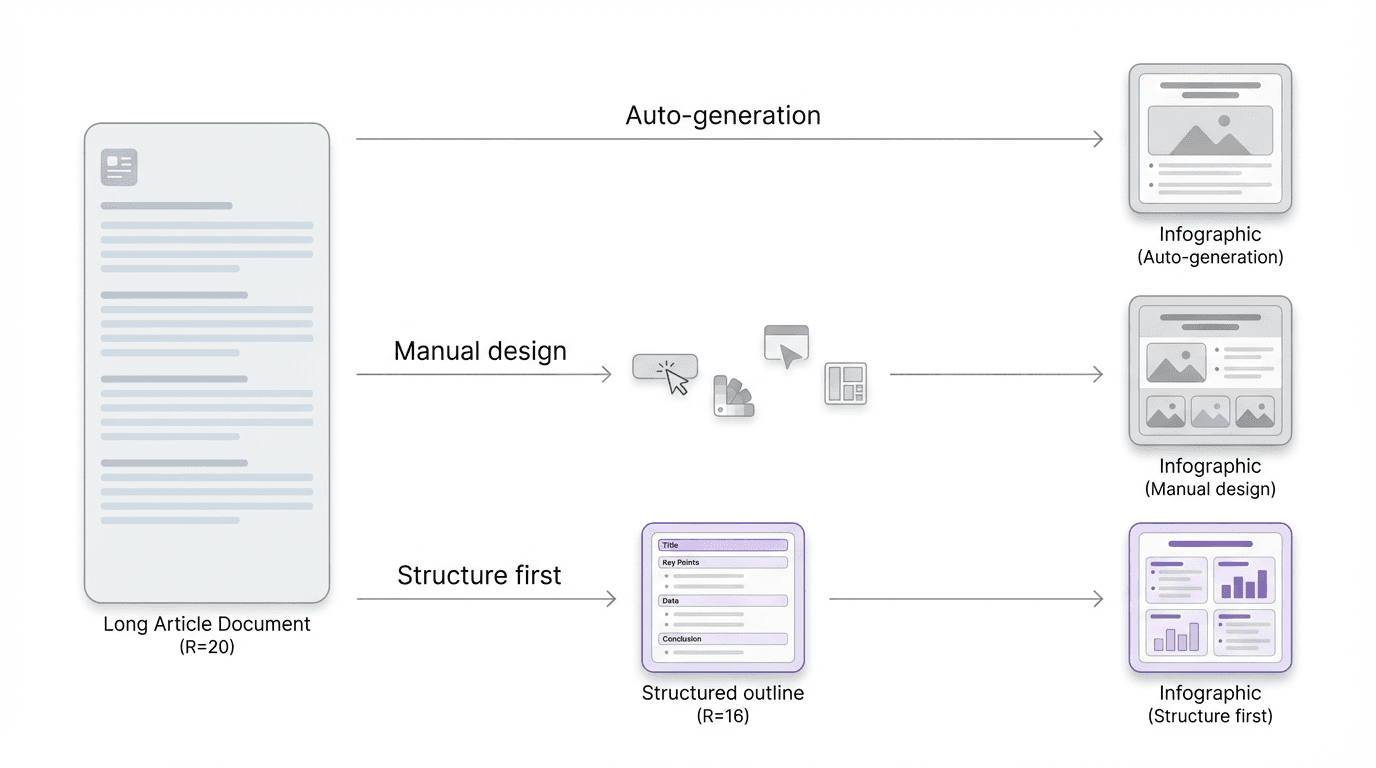
Most article to infographic workflows fall into one of three categories.
1. Direct article-to-graphic generators
These tools usually ask you to paste a URL, article text, or bullet summary, then generate a visual layout automatically.
Their appeal is obvious. They are fast. They reduce manual work. They are useful when the content can tolerate simplification and when the real goal is producing a lightweight visual recap rather than a durable infographic.
The weakness is also consistent. They often confuse extraction with summarization. A long article becomes too many visual blocks, too many sentences survive, and the graphic feels like compressed page text rather than a designed explanation.
If the article is already tightly structured, these tools can work reasonably well. If the article is dense, layered, or uneven, they tend to carry the article's disorder straight into the output.
2. Design-first infographic tools
These tools start from templates, layout systems, and visual editing controls.
They are often the strongest choice for teams that already know the shape of the story. If you have a clear headline, four to six supporting points, and a designer or marketer willing to tune layout, design-first tools can produce polished results.
The tradeoff is speed under ambiguity. The article still has to be reduced before it becomes visual. If that work is not already done, the designer ends up acting as both editor and layout operator.
These tools may look professional without offering the fastest route to a finished infographic.
3. Structure-first summarization tools
FormaLM fits the structure-first category.
A structure-first tool does not begin by asking what style the infographic should use. It starts by clarifying what kind of summary the article needs to become. Is it a sequence, a comparison, a three-part explainer, a key-takeaways card set, a process, or a decision framework?
That move is important because the speed problem usually begins before design.
When the article is still shapeless, any infographic generator will struggle. Once the article has been compressed into a clean information format, the visual step becomes much faster and much less error-prone.
A structure-first tool can save working time by reducing revision, even when it adds one step.
What makes FormaLM different
FormaLM is not best understood as a tool that magically turns an article into finished visual design on its own.
Its real advantage is that it helps you get to the right summary format earlier.
Instead of asking the system to decorate a full article, you can use FormaLM to reshape the article into a cleaner intermediate output such as:
- a five-point key takeaways set
- a step-by-step process summary
- a comparison table
- a decision framework
- a before-and-after breakdown
- a visual brief for a designer or infographic tool
That changes the workflow in a useful way.
You are no longer asking one tool to solve extraction, summarization, hierarchy, and design all at once. You are deciding the structure first, which makes the final infographic easier to produce quickly and easier to trust when it is done.
For teams that care about speed and clarity, that is the more defensible workflow.
Where direct generators are faster, and where they are weaker
Direct article to infographic tools are often faster in the first thirty seconds.
Paste the content. Wait. Pick a style. Export.
If the goal is a rough social card, that can be enough.
But if the article includes layered reasoning, multiple claims, process steps, or a non-obvious hierarchy, the first draft usually needs correction. The tool may over-preserve wording, flatten the argument, or emphasize the wrong sections because it is operating on extraction rather than intent.
The supposedly fast workflow slows down at that point.
Someone has to fix the summary logic. Someone has to remove noise. Someone has to decide which points deserve the infographic at all.
FormaLM is stronger in that middle section of the workflow. It helps produce the compressed structure that a direct generator often skips.
So the tradeoff is simple:
- direct generators are faster when the article is already summary-ready
- structure-first tools are faster when the article still needs shaping
For most real articles, the second case is more common.
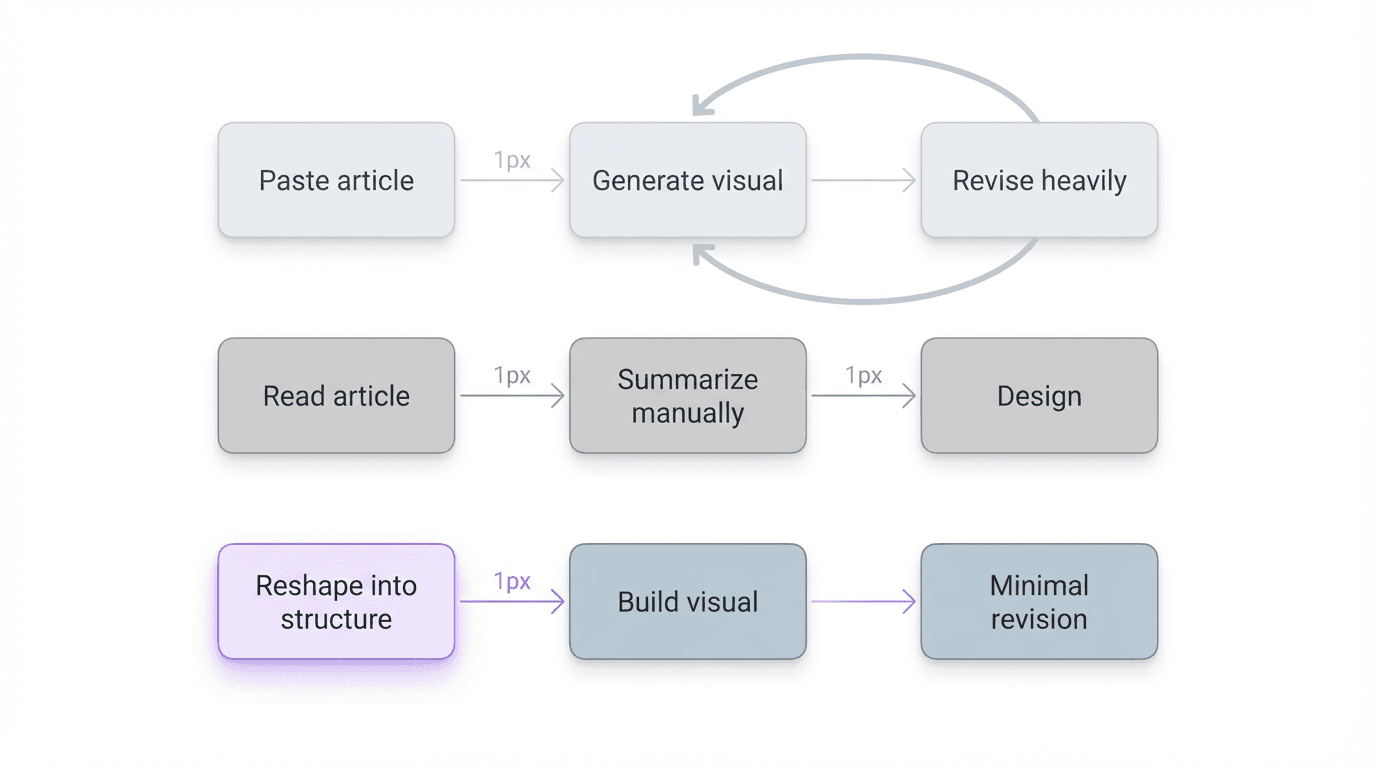
A practical comparison by workflow
If you are evaluating the best article to infographic tool, it helps to compare workflows rather than screens.
Workflow A: Paste article, generate visual immediately
Best for:
- lightweight marketing recaps
- quick social assets
- content that is already tightly edited
Main risk:
- the output looks finished before the thinking is ready
Workflow B: Manually summarize, then design
Best for:
- high-control design teams
- brand-sensitive outputs
- infographics with a fixed narrative already defined
Main risk:
- the workflow is clear, but slow
Workflow C: Reshape article into a structured summary first, then create the visual
Best for:
- dense educational content
- research summaries
- product explainers
- internal knowledge content
- teams that want speed without losing hierarchy
Main risk:
- it looks like an extra step until you factor in revision time
FormaLM shortens the decision about what the visual summary should contain and how its pieces should relate.
When FormaLM is the better choice
FormaLM is the better article to infographic tool choice when the bottleneck is not visual styling. It is content reduction.
That usually means:
- the article is long and uneven
- the key points are real, but buried
- the infographic needs a clear reading order
- the output will be used for teaching, explanation, or handoff
- the team wants a repeatable workflow, not a one-off graphic
In these cases, the most useful result is a strong visual summary rather than a decorative first draft.
For teams without a dedicated designer on every asset, FormaLM creates an intermediate output that can stand alone or move cleanly into a design tool.
When another tool may be enough
FormaLM is not the strongest choice if you only need instant visual variety and do not care much about structural precision.
If the article is already short, already broken into simple points, and mainly needs to become a promotional visual, a direct generator or design-first template tool may be enough.
This approach works when minor changes to the content order do not matter.
Once the content has to work as both an explanation and a graphic, organization matters more than speed alone.
FormaLM becomes more useful once the content itself needs help.
The best article to infographic tool is the one that reduces the right work
Templates, graphic styles, output polish, and one-click generation cover the visible part of the workflow. More time is often lost deciding what the infographic should say and how to shape the information.
The best tool reduces that ambiguity early and makes the visual step easier to finish. FormaLM first turns the article into a usable visual-summary format, creating a clearer path to the final infographic.